The client brief
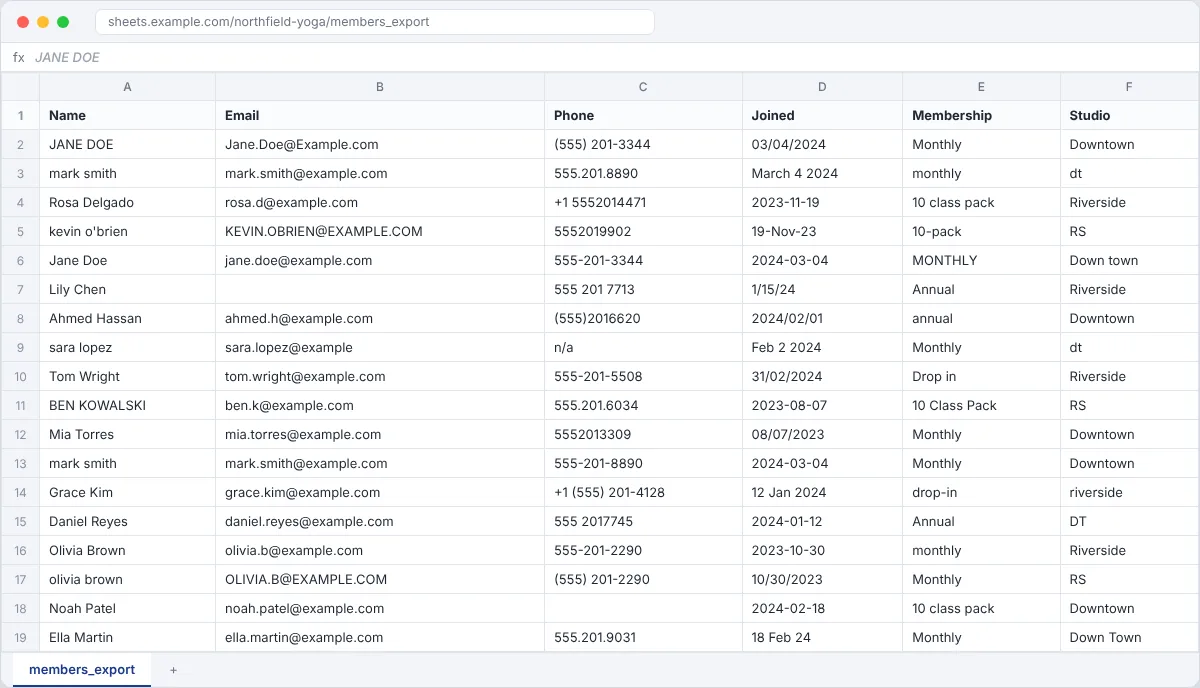
Northfield Yoga runs two studios. Their member list was typed by four different people over three years. Names, dates and phone numbers are all over the place, and some people are in there twice. They want it clean before moving to a new booking system. Made-up client, fake data.
Your deliverables
- The cleaned sheet on a tab called Clean, with the original kept on a tab called Raw
- A short change log: what you fixed and how many rows
- A list of rows the client needs to confirm
Do the task
Copy before you touch anything
Import the CSV into Google Sheets. Duplicate the tab, name it Raw, and only work on the copy.
Fix names and emails
Use PROPER and TRIM for names, LOWER and TRIM for emails. Then paste the results back as values.
Make dates and phones match
Pick one format (2024-03-04 for dates, 555-201-3344 for phones) and use it on every row.
Lock down categories
Membership and Studio should only have a few allowed values. Fix them with Find and replace, then add a dropdown so it stays clean.
Remove duplicates
Data, Data cleanup, Remove duplicates. Check by email, not name. Write down how many you removed.
Flag what you can't fix
Missing emails, impossible dates. Highlight them and list them for the client. Never make up data.
Screenshots to capture for your portfolio
- Before: the Raw tab
- After: the Clean tab with dropdowns
- Your change log
- The rows you flagged
More tips
- Spot duplicates fast with conditional formatting and the formula
=COUNTIF(B:B,B2)>1. - Freeze the header row so it stays visible when you scroll.
- Time yourself. Clients like hearing how long a cleanup takes.
- There's one impossible date hiding in the sheet. Find it.
Follow Kailami