Build your portfolio website, free.
No coding, no paid hosting. You fill in your details, Claude builds the site, GitHub puts it online at yourname.github.io. About 45 minutes.
What you'll end up with
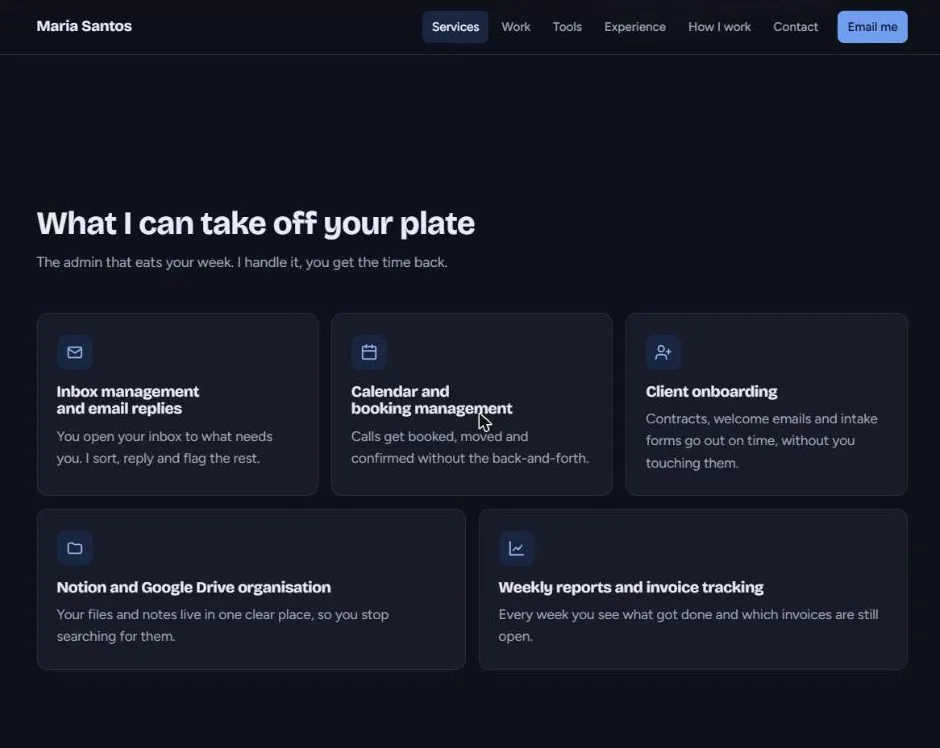
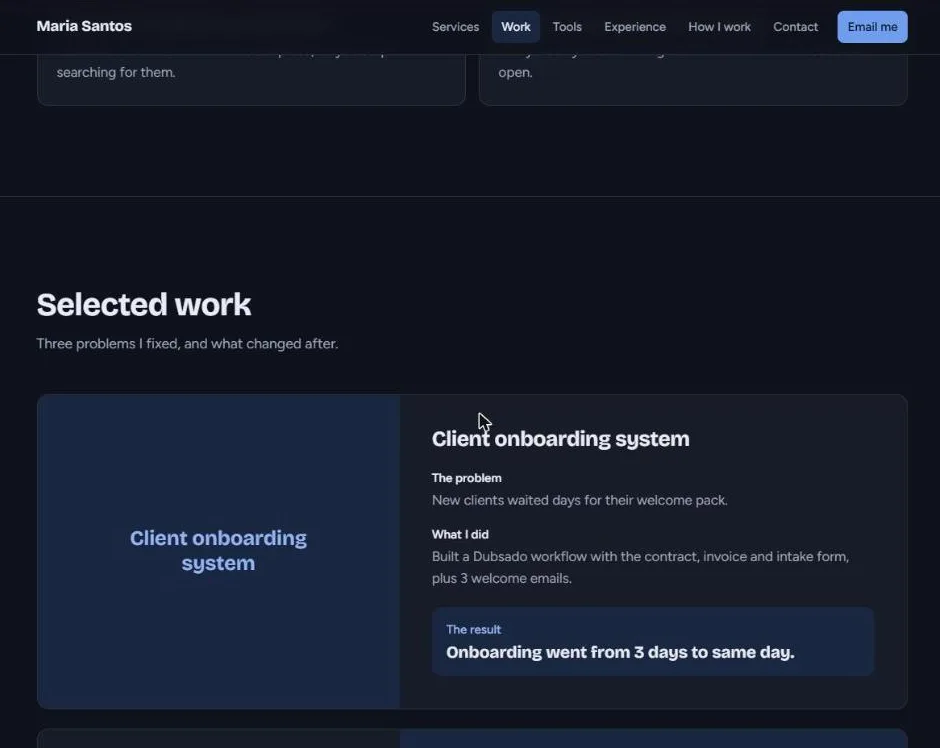
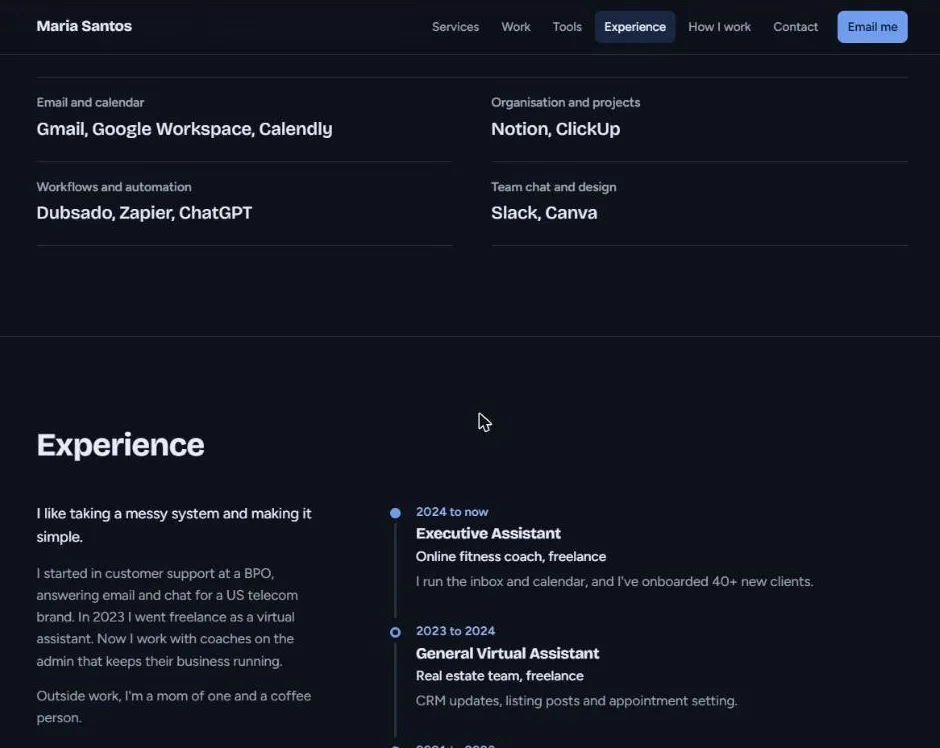
Real screenshots of what Claude built from this prompt for Maria, a sample VA we made up. Yours uses your words, photo and colours.

Get these ready first
File names matter. Lowercase, no spaces, and the ending must match: profile.png won't show if the site looks for profile.jpg. On Windows, turn on "File name extensions" in File Explorer's View menu.
Nothing to put in it yet? Start here
Every part of your portfolio has a free tool behind it. Real content, not filler.
Fill in your details
Your prompt builds itself as you type and saves to your account. Only write what's true: Claude won't invent clients, numbers or reviews, and skips empty sections.
Works in ChatGPT too (it builds the page in Canvas). Claude usually gives a better-looking result.
Paste it into Claude and send
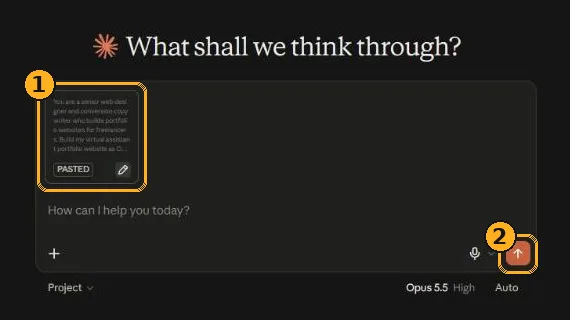
- Paste with Ctrl+V (Cmd+V on Mac) into a new chat. A long prompt turns into a small PASTED card. That's normal, Claude still reads all of it.
- Send it with the arrow button. Claude takes a minute or two to write the whole site.
If Claude asks you a question first, just answer it. If the reply stops halfway or ends with something like "add the rest here", send: "The file is incomplete. Send the complete index.html again in one artifact, start to finish."
Check the preview, then copy the code
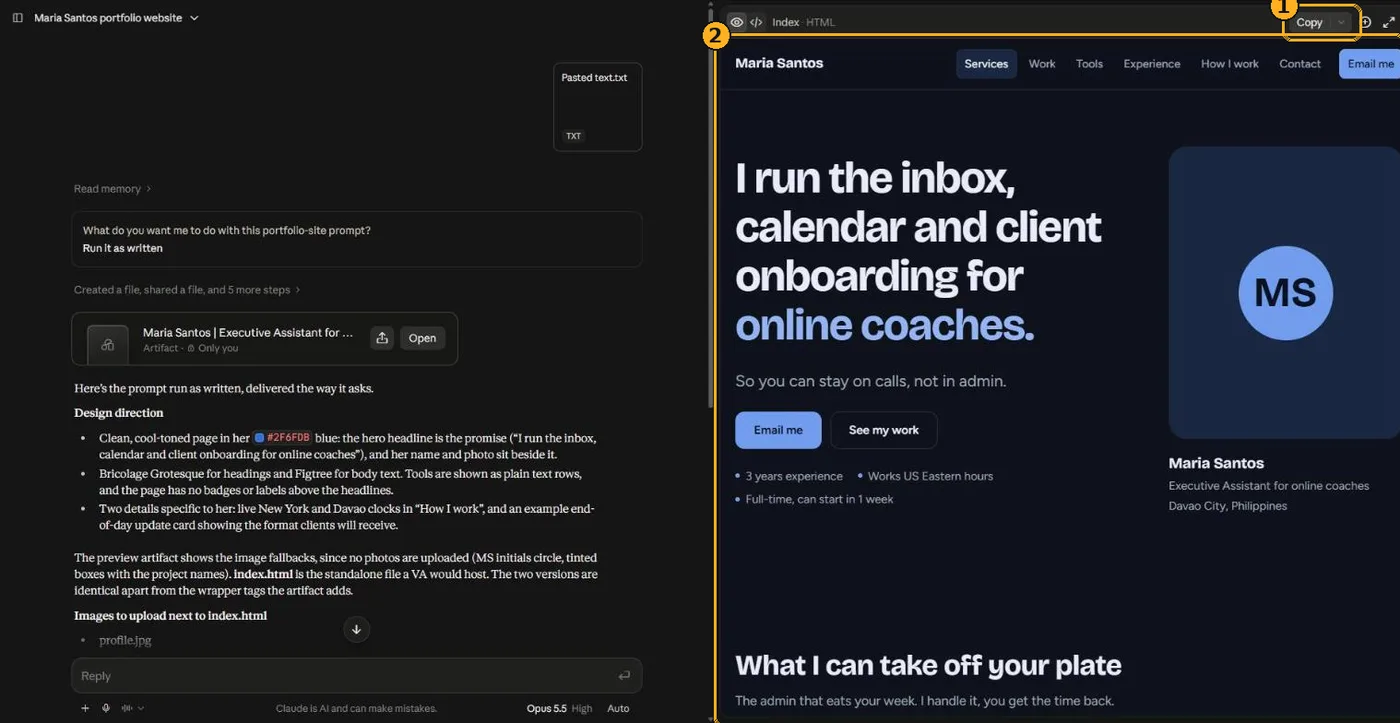
- Copy copies the whole website's code in one go. Don't try to select it by hand.
- The preview is your actual site. Scroll through it, check every word, and fix anything before you copy. Missing photos show as initials for now; they appear once you upload them in step 6.
Want changes? Send one of these (one change at a time works best)
Create your website's home on GitHub
Signed in to GitHub, click the + at the top right, then New repository. (Or go straight to github.com/new.)
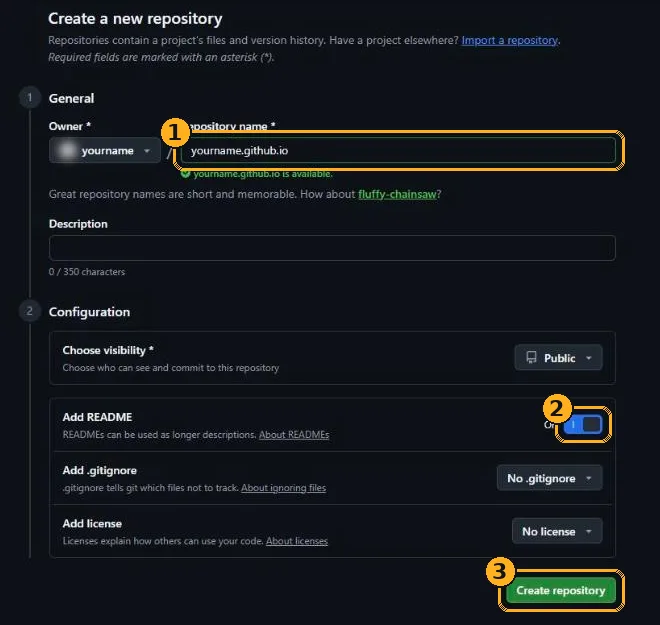
- Repository name: type your GitHub username followed by
.github.io, exactly. If your username is mariasantos-va, typemariasantos-va.github.io. All lowercase. - Add README: switch it On. Leave visibility on Public (free websites need a public repository).
- Click Create repository.
Add your website file
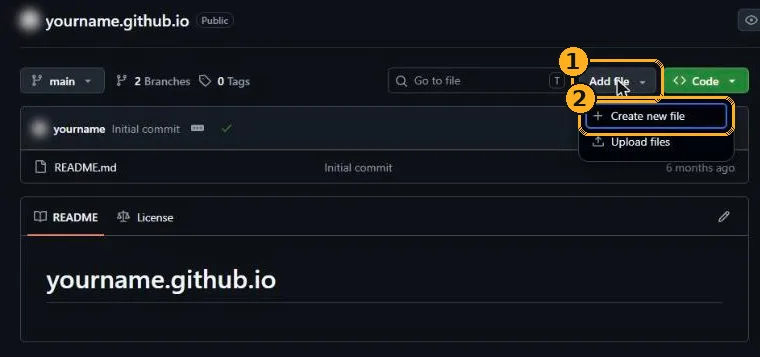
- On your new repository, click Add file.
- Choose Create new file.

- Name the file
index.html. Exactly that, lowercase. - Paste the code you copied from Claude into the big box (Ctrl+V). It's long; that's fine.
- Click Commit changes..., then the green Commit changes button in the box that pops up.
Upload your photos
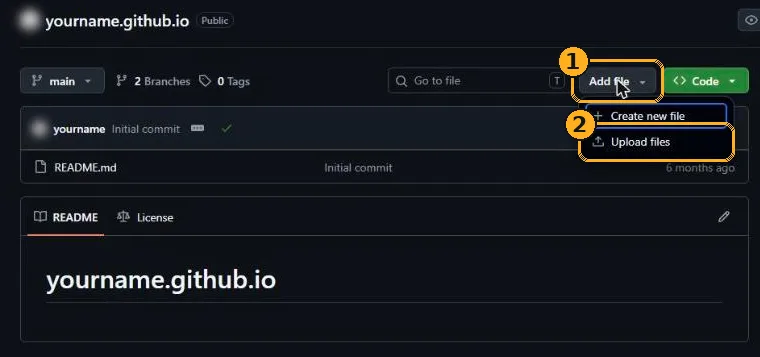
- Back on the repository page, click Add file.
- Choose Upload files.
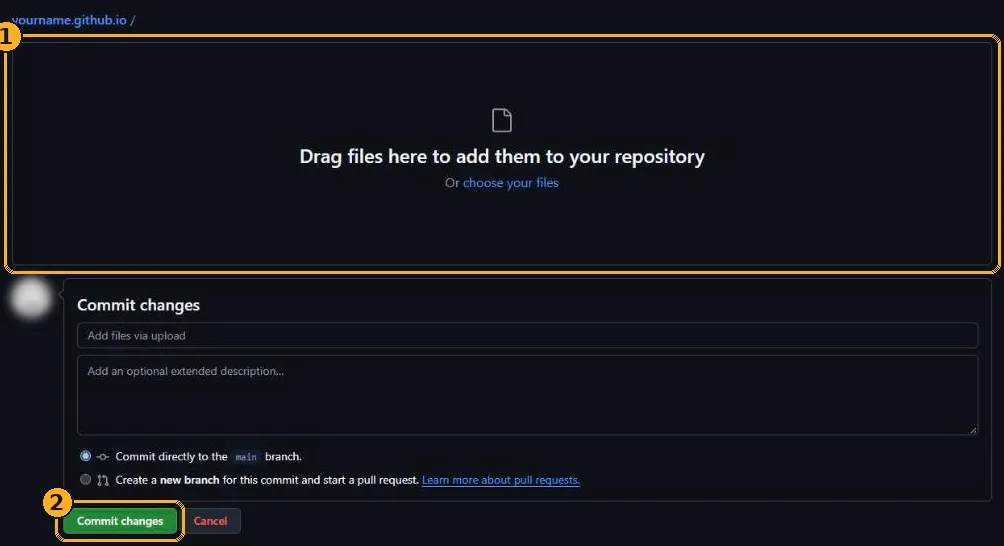
- Drag in
profile.jpgand yourwork-1.jpg,work-2.jpg... files. Drop them straight in, not inside a folder. - Click Commit changes.
Turn it on and go live
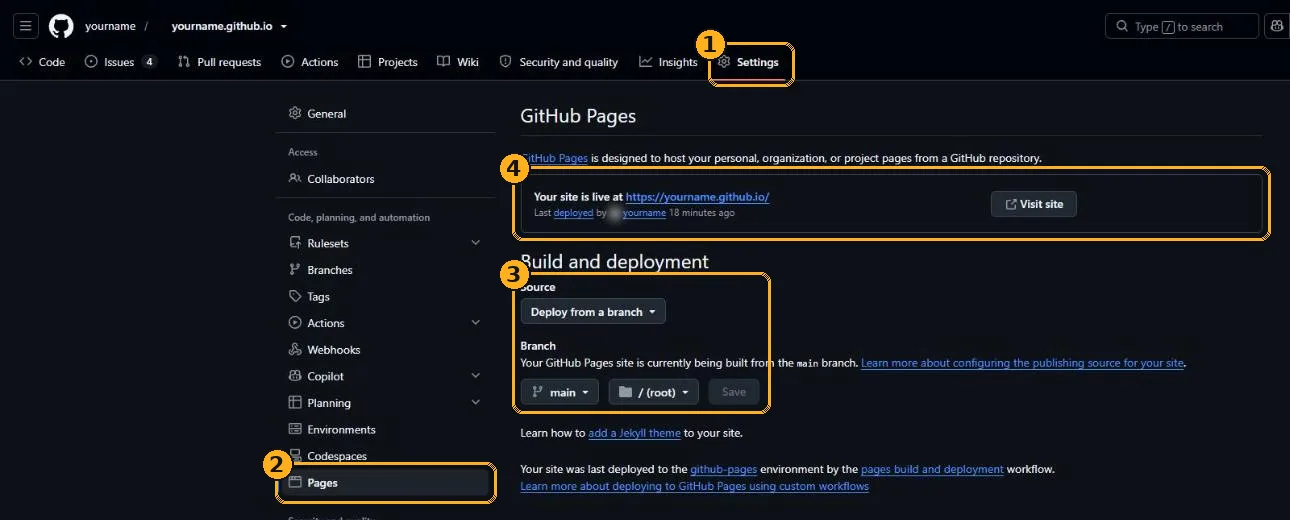
- Click Settings at the top of your repository.
- Click Pages in the left menu.
- Under Build and deployment, make sure Source says Deploy from a branch and Branch says main and / (root). If you had to change anything, click Save.
- Wait 1 to 3 minutes and refresh. When you see "Your site is live at...", click Visit site. That address is your portfolio.
Put it everywhere
Where to share it
Your OnlineJobs and Upwork profiles, LinkedIn's Featured section, your email signature, and every proposal you send. Open it on your phone once before sharing.
Updating it later
Ask Claude for the change in the same chat, copy the new code, then on GitHub open index.html, click the pencil icon, select all, paste, and commit. New photos: upload with the same file name and it replaces the old one.
Keep it safe
This site is public. Never put your home address, ID numbers, rates you don't want to share, or a client's private details on it. Use real testimonials only, with the client's permission.
If something goes wrong
I see a 404 "There isn't a GitHub Pages site here"
Wait 3 to 5 minutes and refresh, the first build is slow. Then check: the repository is named exactly yourusername.github.io, it's Public, and the file is called index.html (lowercase) and sits at the top level, not inside a folder.
My photos don't show
The name has to match exactly, including the ending and capital letters: Profile.JPG is not profile.jpg. Upload the photo again with the right name, or ask Claude to use your file's actual name. Photos also need to be at the top level next to index.html.
The site looks half-finished or broken
The code got cut off when you copied it. In Claude, send: "The file is incomplete. Send the complete index.html again in one artifact." Then replace the file on GitHub with the new version.
Claude says I've hit my limit
The free plan has a message limit that resets after a few hours. Your chat is saved, come back to the same chat later and keep going.
I don't like my username in the address
You can rename your GitHub account in Settings, then rename the repository to match. Or buy your own domain (around $10 a year) and connect it under Settings → Pages → Custom domain.