The client brief
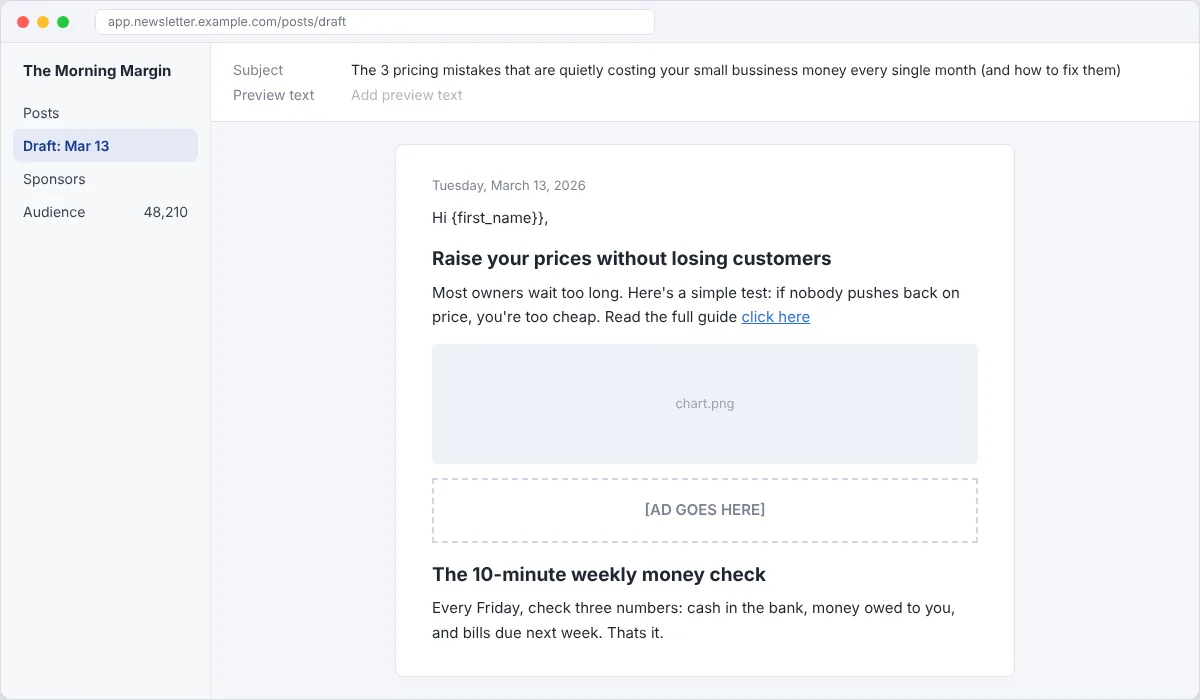
The Morning Margin is a weekday newsletter for small business owners. Tomorrow's issue is drafted but the editor is out sick. QA it, add the sponsor's ad, and send it back for approval by 5pm. Made-up client, fake data.
Your deliverables
- A QA checklist you can reuse every issue
- A list of every error you found and how you fixed it
- The sponsor ad placed to the brief
- A mobile preview or test send
Do the task
Build the checklist first
Subject, preview text, date, merge tags, links, images and alt text, spelling, sponsor label, footer. Then use it.
Read it twice
Once for meaning, once for errors. Read the subject and preview text the way a subscriber sees them on a phone.
Click every link
Mark broken links and placeholders. Check the merge tag format matches the platform.
Place the ad
Follow the brief exactly: position, the "Sponsored" label, word count, tracking link. Don't rewrite their copy without asking.
Preview on mobile
Most people read on phones. Check images, spacing and button size.
Send the editor a summary
What you fixed, what needs her call, and when it's ready.
Screenshots to capture for your portfolio
- The draft with your notes
- Your QA checklist
- The placed ad
- The mobile preview
More tips
- There are at least eight problems in the draft. Find them all.
- Check the day and date match. Wrong dates are the most common miss.
- A missing unsubscribe link is a legal problem, not a style one. Flag it first.
- Got a free account? Rebuild the issue and send a test to yourself for a real screenshot.
Follow Kailami