The client brief
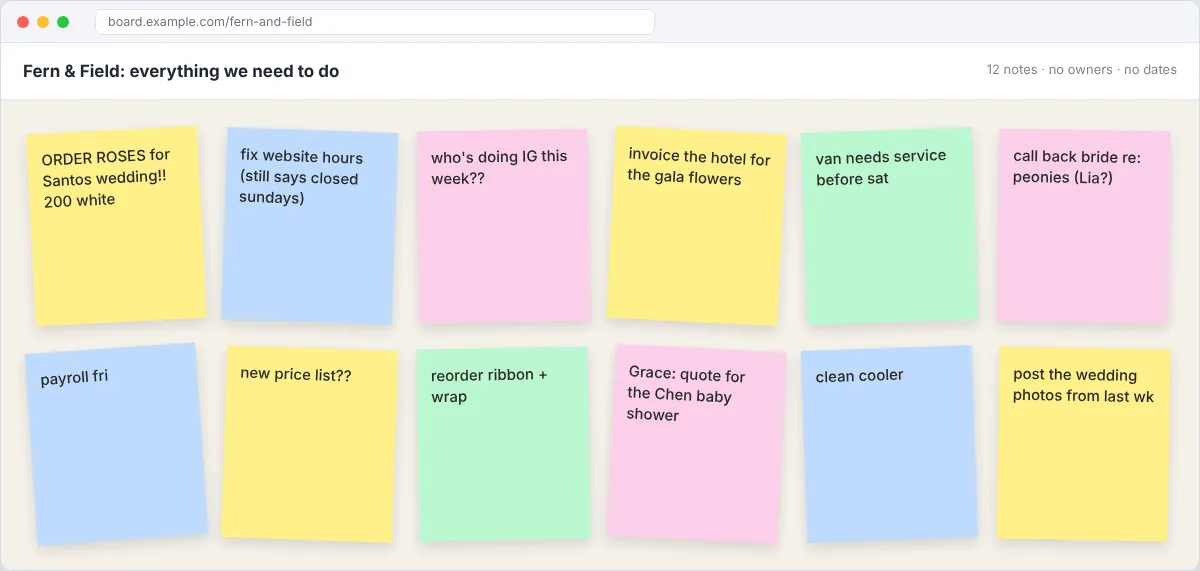
Fern & Field is a four-person flower shop that also does weddings. Tasks live in a group chat and on sticky notes, and things get missed. The owner, Grace, wants one board where she can see who's doing what this week. Made-up client, fake data.
Your deliverables
- A board with simple columns (To do, Doing, Waiting, Done)
- Every task as a card with an owner, due date and label
- Two templates: a wedding order checklist and a weekly admin checklist
- A short "how we use this board" guide, five rules max
Do the task
Sort the mess
Group the notes: weddings, shop orders, admin, marketing. Those groups become your labels.
Keep the columns simple
To do, Doing, Waiting on someone, Done. More columns means nobody updates it.
Turn notes into cards
Rewrite each one as an action, like "Order 200 white roses for Santos wedding". Add an owner, a due date and a label.
Build two templates
A wedding checklist (consult, deposit, order flowers, prep, deliver, invoice) and a weekly admin checklist.
Write the rules
Five lines max: who adds cards, when to move them, what Done means.
Show it in use
Move a few cards across so the board looks lived in, then take your screenshots.
Screenshots to capture for your portfolio
- Before: the sticky note wall
- After: the full board
- An open card with a checklist
- Your five rules
More tips
- Start every card with a verb. "Invoice the hotel", not "Hotel invoice".
- Only add due dates that are real. Fake deadlines get ignored.
- Try one free automation, like moving a card to Done when its checklist is complete.
- A calendar view of the board makes a great extra screenshot.
Follow Kailami